LTBox
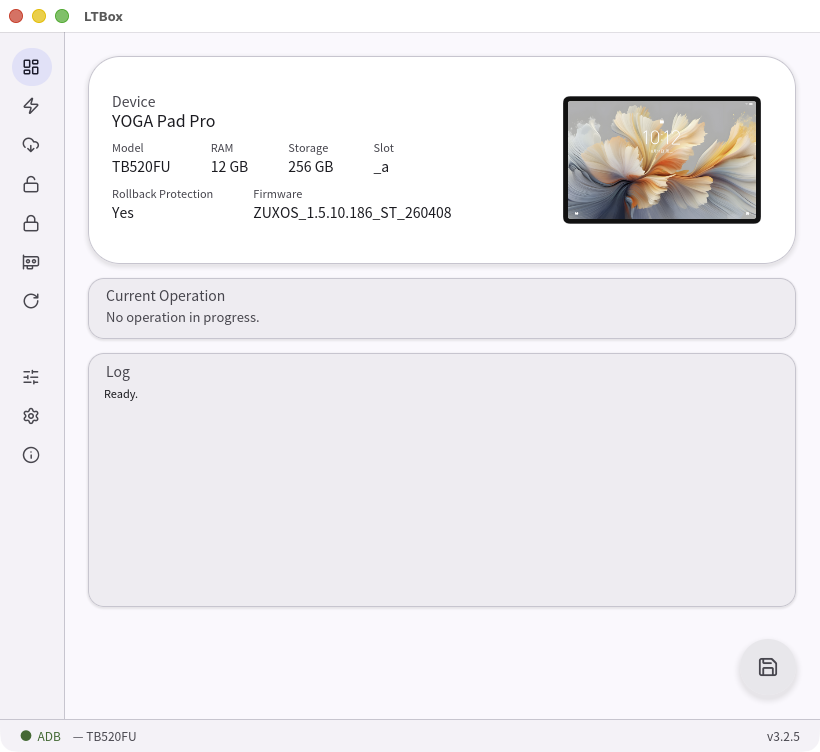
LTBox is a tool for flashing and modifying firmware on certain Lenovo tablets. It can switch firmware between the PRC (China) and ROW (Global) regions, root and unroot the device, bypass rollback protection, and read or write partitions over EDL (9008) mode.
Modifying firmware can brick your device, cause data loss, or void your warranty. You use LTBox at your own risk.
Quick start
Windows — x86_64 / arm64
Recommended: Install with Scoop. The Windows build carries no code-signing certificate.
-
Install LTBox:
Commandscoop bucket add ltbox https://github.com/miner7222/scoop-bucket scoop install ltbox -
Update LTBox later:
Commandscoop update ltbox - Open LTBox, pick a task from the sidebar, and follow the wizard.
Manual archive alternative (without a package manager)
- Download the latest release and extract the zip (no spaces or special characters in the path).
- Double-click
ltbox.exe. - Pick a task from the sidebar and follow the wizard.
LTBox can use either the kernel or the userspace Qualcomm USB driver,
switchable in Settings → Qualcomm USB driver. Windows defaults to the kernel
driver (the same one QFIL uses, so you can switch between the two tools without reinstalling). When the
selected driver is missing, the dashboard shows a driver banner — click Install and LTBox
downloads the matching signed release
(qcom-usb-kernel-drivers or
qcom-usb-userspace-drivers)
and runs its installer; approve the Windows UAC prompt when it appears. A reboot is recommended afterward.
Quick start
Linux — x86_64 / aarch64
Recommended: Install with APT or YUM/DNF. Choose the alternative for your distribution.
-
Debian/Ubuntu (APT)
Commandsudo install -d -m 0755 /etc/apt/keyrings curl -fsSL https://miner7222.github.io/ltbox-repo/ltbox-repo.asc | sudo tee /etc/apt/keyrings/ltbox-repo.asc >/dev/null echo "deb [arch=$(dpkg --print-architecture) signed-by=/etc/apt/keyrings/ltbox-repo.asc] https://miner7222.github.io/ltbox-repo stable main" | sudo tee /etc/apt/sources.list.d/ltbox.list >/dev/null sudo apt update sudo apt install ltboxUpdate LTBox later:
Commandsudo apt update sudo apt upgrade ltbox -
Fedora (YUM/DNF)
Commandsudo rpm --import https://miner7222.github.io/ltbox-repo/ltbox-repo.asc cat <<'EOF' | sudo tee /etc/yum.repos.d/ltbox.repo >/dev/null [ltbox] name=LTBox baseurl=https://miner7222.github.io/ltbox-repo/yum/$basearch enabled=1 gpgcheck=1 repo_gpgcheck=1 gpgkey=https://miner7222.github.io/ltbox-repo/ltbox-repo.asc EOF sudo dnf install ltboxUpdate LTBox later:
Commandsudo dnf upgrade ltbox - Replug the device once after installing.
- Open LTBox from the app menu, pick a task from the sidebar, and follow the wizard.
Manual archive alternative (without a package manager)
-
Install the runtime dependencies (Debian/Ubuntu shown — adapt for your distro):
Commandsudo apt install \ libusb-1.0-0 libudev1 \ libxkbcommon0 libxkbcommon-x11-0 libwayland-client0 \ libxcb1 libxcb-render0 libxcb-shape0 libxcb-xfixes0 \ libfontconfig1 \ xdg-utils - Download the latest release Linux tarball and extract it (
tar -xzf LTBox-linux_*.tar.gz). The executable bit onltboxis preserved. -
Install the udev rules so the desktop session can open the Qualcomm 9008 / Lenovo USB devices without root:
Commandsudo ./ltbox --install-udev - Replug any connected device.
-
(Optional) Add an app-menu entry and icon (per-user, no root):
Command./ltbox --install-desktopThis drops a
.desktopfile under~/.local/share/applications/and the SVG icon under~/.local/share/icons/hicolor/scalable/apps/. GNOME / KDE pick it up within a few seconds. Re-run after moving the binary. - Run
./ltbox.
The udev rules above cover ADB access and the userspace EDL path. On Debian-based distros
LTBox defaults to the kernel EDL driver (Qualcomm's qud package) and offers to
install it from the dashboard banner via pkexec. Non-Debian distros stay on userspace. Switch
modes anytime in Settings → Qualcomm USB driver.
Quick start
macOS — universal (Apple Silicon + Intel)
Requires macOS 11 (Big Sur) or later.
Recommended: Install with Homebrew. The macOS build carries no code-signing certificate; the app bundle is ad-hoc signed and not notarized, so Gatekeeper blocks it until the quarantine attribute is cleared — the Homebrew install needs that step just as the manual one does. A third-party tap must also be trusted once before Homebrew will load its cask.
-
Install LTBox:
Commandbrew tap miner7222/tap brew trust miner7222/tap brew install --cask ltbox -
Update LTBox later:
Commandbrew upgrade --cask ltbox
Manual archive alternative (without a package manager)
- Download the latest release macOS tarball (
LTBox-macos_universal-*.tar.gz) and extract it (tar -xzf LTBox-macos_universal-*.tar.gz). - (Optional) Move
LTBox.appto/Applications.
Then, however you installed it:
-
The bundle is ad-hoc signed, so Gatekeeper blocks the first launch. Clear the quarantine once, either way:
- right-click
LTBox.app→ Open, then confirm in the dialog, or - run the command below (adjust the path if the app is not in
/Applications).
Commandxattr -dr com.apple.quarantine /Applications/LTBox.app - right-click
- Open
LTBox.app, pick a task from the sidebar, and follow the wizard.
macOS may still block the app even after the steps above. Open System Settings → Privacy & Security, scroll down to the Security section, and click Open Anyway next to the "LTBox" was blocked to protect your Mac message, then confirm with Touch ID or your password.
No separate USB driver setup is needed on macOS — the Qualcomm 9008 (EDL) and ADB devices are reached directly through the bundled libusb. Replug a device if it isn't detected.
Guides
Supported devices
Every Snapdragon Lenovo device released before 2026 ships a bootloader that trusts the AOSP test key, starting with the Lenovo Z5 Pro‡ in 2018.§ It only became public in the Chinese community — and LTBox only written — in 2025, so support is limited to the models below, chosen for what could be tested and what was worth testing.
| Device | ZUXOS | ZUI |
|---|---|---|
| Legion Tab Y700 2nd Gen | Full support | 17.0.339 and earlier † |
| Xiaoxin Pad Pro GT / Yoga Tab 11.1 AI | 1.5.04.428 and earlier † | 17.5.04.059 and earlier † |
| Yoga Pad Pro AI / Yoga Tab Plus AI | 1.5.10.186 and earlier † | 17.5.10.096 and earlier † |
| Legion Tab Y700 3rd Gen | 1.5.10.236 and earlier † | 17.5.10.170 and earlier † |
| Legion Tab Y700 4th Gen | 1.5.10.138 and earlier † | NONE |
‡ Tablets. On tablets the range starts with the Lenovo Yoga Smart Tab, released in 2019.
§ Exception. Models with a near-identical Motorola counterpart are not affected — their firmware appears to have been built by the Motorola team, which was not exposed to this vulnerability.
† Cutoff. Some models received an OTA that replaces the AvbRSAPublicKey
embedded in the ABL from the AOSP test key to a new key.
On some 2026 hardware the above vulnerability is gone, but a new GBL exploit lets unsigned code run through
efisp — LTBox supports most features on the device below through that path.
| Device | ZUXOS | ZUI |
|---|---|---|
| Legion Tab Y700 5th Gen | Full support | Full support |